
iPhone Screen Repair: What Happens at the Repair Bench
The phone arrives with a diagonal crack running from the top corner towards the keyboard area. It still rings. The customer can read messages, but the screen sometimes misses the first tap and a faint green line appeared that morning. On a busy repair bench, that description is not treated as a simple request to “change the glass”. It becomes the starting point for an evidence-based iPhone screen repair. Before any screw is removed, the model is confirmed and the device is examined under neutral light. The technician records the crack, checks the frame and looks for signs that the phone has been opened before. Brightness moves from minimum to maximum. A white screen exposes discolouration; a dark screen reveals glow, lines and dead pixels. Slow touch traces run around every edge. This report follows the normal logic of the bench. Exact procedures vary between generations, but the principles remain steady: document the starting condition, protect delicate parts, choose a repair that matches the fault, and test the phone as a complete system rather than judging the new surface by appearance alone.

iPhone Screen: professional assessment and repair decisions
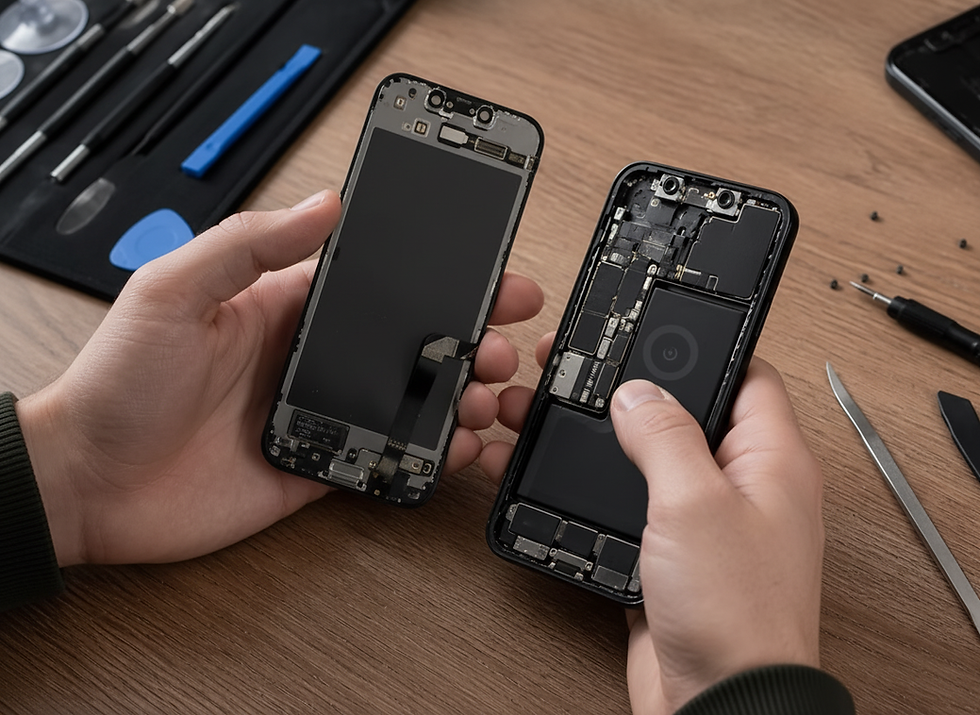
The first iPhone Screen checks. The customer’s account of the impact often supplies the first clue. A face-down fall may shatter the front surface, while a corner strike can twist the housing and stress the display connector. A phone that was briefly wet after cracking needs a different inspection from one that has remained dry. The technician asks about lines, flicker, ghost touch, camera fogging and unusual heat because those details help define the risk. The pre-repair record protects both the customer and the workshop. Cameras, speakers, microphones, charging, buttons, proximity sensing and biometric functions are checked where possible. If Face ID already fails, that fact should be clear before the screen is lifted. If the display is too damaged to test, the limitation should also be recorded rather than guessed. Opening an iPhone Screen without rushing. Adhesive softens under controlled conditions, then the display is lifted with tools that limit stress on the glass and frame. The technician works around known cable positions and does not drive a pick deeper than necessary. Once open, power is isolated before display connectors are handled. The interior is checked for moisture indicators, loose shields, previous damage and debris. Depending on the diagnosis, the repair may involve front-glass refurbishment, a complete display assembly or additional frame work. Parts are matched to the exact model. Brackets, sensor assemblies and seals are transferred or replaced only where the procedure calls for it, with careful attention to features linked to the original device.
iPhone Screen problems customers commonly face
1. A green or white line appears after the drop. A persistent vertical line usually suggests damage within the OLED panel or its connection rather than a crack in the outer surface alone. The line may remain stable or multiply. Bench testing determines whether reseating is relevant, but impact-related panel faults commonly require a complete display replacement. 2. The screen responds with a delay. Delayed or inconsistent touch can come from the digitiser, connector, software or frame pressure. The technician compares behaviour before and after a restart, tests all zones and observes whether the fault changes with brightness or temperature. A repair recommendation should be tied to those results. 3. The display is black but the phone vibrates. Sound, vibration or computer recognition can show that the phone is running while the display path has failed. The cause might be panel damage, a disconnected cable or a deeper board issue. A known-good test screen can help narrow the fault without promising that every black-screen phone needs only a new display. 4. The top of the screen has poor touch. Damage around the notch or sensor area deserves particular care because proximity and biometric components sit nearby. A top-zone touch fault may be part of the display, but the impact can also affect brackets or cables. The bench inspection looks beyond the visible crack. 5. The replacement screen lifts after a few days. Lifting is not normal. It can result from a bent frame, contamination, unsuitable adhesive, poor preparation or battery swelling. Pressing it down is not a proper fix. The device needs to be opened and the cause identified before the screen or battery is damaged further.
Why iPhone Screen repair can be more economical
For a phone that still meets the owner’s needs, repair can preserve far more value than the damaged screen suggests. The camera system, storage, processor, accounts and accessories remain useful. Paying for a targeted iPhone Screen repair may avoid the larger expense and disruption of replacing the complete handset. Professional diagnosis is part of that saving. It helps prevent buying the wrong service, fitting a display to a distorted frame or overlooking liquid exposure. A reliable repair should be considered over its usable life, not just at the collection desk. The economical option is the one most likely to solve the actual fault without compromising healthy functions. With the new or refurbished display connected, the phone is powered before final sealing so image and touch can be checked. The technician looks for uniform brightness, correct colour behaviour, edge response, typing accuracy and stable connectors. Sensors and cameras are tested again. Only after those checks does the device return to final assembly and adhesive pressure. The last stage resembles the first: the phone is used, not merely admired. Calls are made, the keyboard is worked, scrolling is repeated and the screen is viewed at several angles. The final condition is compared with the intake record. When the customer collects it, the explanation should include what was found, what was replaced and any aftercare limitations.
Choosing the correct iPhone repair route
The exact generation matters. An iPhone 17 Pro Max has a different screen assembly from an iPhone 17 Pro, standard iPhone 17, iPhone 16 Pro Max or iPhone 16. The broader iPhone repairs section helps customers start with the correct device family before selecting a service.
A screen assessment in Glasgow checks whether damage is cosmetic or functional. Where symptoms are intermittent, screen diagnostics in Glasgow provide a stronger basis for choosing the screen service in Glasgow. Customers can compare available screen solutions in Glasgow and use screen care in Glasgow for sensible aftercare and protection advice.
A screen impact can expose a separate battery problem. Battery replacement in Glasgow is relevant when health is clearly poor, while weak battery support in Glasgow is useful when symptoms are uncertain. Fast-draining battery checks in Glasgow can separate heavy use from cell wear, and battery diagnostics in Glasgow establish whether a full battery service in Glasgow should be combined with the screen work.
For older devices, an iPhone 11 diagnostic can clarify whether the problem is limited to the display. A confirmed panel fault may need iPhone 11 display repair, while rear damage belongs under iPhone 11 back glass repair. Charging and power faults are addressed separately through iPhone 11 charging port repair or iPhone 11 battery replacement.
Liquid exposure changes priorities, so iPhone 11 water damage treatment should be considered before repeated charging. The same diagnostic discipline applies to an iPhone 11 Pro diagnostic and iPhone 11 Pro back glass repair. On later models, iPhone 12 front glass repair may preserve a healthy original panel, while iPhone 12 OLED display repair is the appropriate route when the OLED itself has failed.
iPhone Screen questions and answers
Question 1: Will an iPhone Screen repair delete my data? Answer: Screen work does not normally erase data, but every device can develop unrelated faults. A current backup is sensible before any repair whenever the phone remains usable. Question 2: Can I keep using an iPhone with one small crack? Answer: You may be able to, but cracks can spread, create sharp edges and reduce protection against moisture. A professional assessment clarifies whether monitoring is reasonable. Question 3: Will Face ID still work after screen repair? Answer: A standard screen repair should preserve compatible original sensor components and careful handling is essential. Existing Face ID faults or impact damage must be assessed separately. Question 4: Why are there different display options for the same model? Answer: Replacement parts can differ in technology, source, construction and specification. PROFIX explains available options so the customer understands the balance of performance, price and suitability. Question 5: What should I check when I collect the phone? Answer: Check brightness, colour, touch across the edges, typing, cameras, calls and any features important to you. Report anything unexpected promptly rather than pressing or twisting the screen.
A practical final view on iPhone Screen
The right repair should be based on the exact model, the condition of the device and test results rather than guesswork. PROFIX explains the available route before work begins, checks related functions after the repair and helps the owner compare the value of repair with replacement. That measured approach protects the device, the customer’s data and the money already invested in it.


Comments